🏠 Atari Jaguar Developer Reference ▸ CD-ROM Subsystem ▸ CD-ROM Programming Procedures & Guidelines
CD-ROM Programming Procedures & Guidelines
Practical recipes for booting from CD, reading data reliably, minimizing delays, swapping discs, and the rules your title must follow for production approval.
Source: Jaguar CD-ROM developer manual (scanned), © Atari Corp. 1995, §2 and §6 (pp. 5–14, 27–31, printed). This is a “living document” in the original — details may change, but not in ways that require game-code changes.
Boot sequence
- The CD Boot ROM authenticates the disc, then loads the TOC to
$2C00. - It reads the boot track (first track of Session #1), takes the load address and code length from the two Motorola longwords after the header, and loads up to 64 KB of your startup code to that address.
- It transfers 68000 control to the start of your startup code.
- Your code parses the TOC at
$2C00, finds the first track of Session #1, and computes all other track/time codes as offsets from it.
See boot track format.
Do: rely on the TOC at
$2C00(already loaded for you). Don’t: callCD_getocin shipping code, and don’t reference absolute track numbers — mastering renumbers them.
Reading data reliably
Typical flow (GPU path):
CD_setup— once, before anything else.CD_mode— set speed (double) and mode (data).- One of
CD_init/CD_initf/CD_initm— once, to load the GPU ISR. CD_read— as many times as needed; it returns immediately.- Poll
CD_ptrfor the write position; checkerr_flag. CD_ureadto stop a transfer early or free resources.
Inexact reads. With CD_init/CD_initf, request a time code 6 frames
before the data you need and search the first 31 frames (72,912 bytes) for
your partition marker. With
CD_initm, the BIOS finds the marker (passed in D1)
and auto-locates the data — no manual search.
The latency rule. At double speed the CD interrupt fires every ~90 µs, leaving a usable budget of ≈54 µs (less with heavy Object Processor use). No processor with priority over the GPU may hold the bus longer than that.
- The classic failure: a 68000 vertical-blank handler that takes too long —
symptom:
CD_readstops after transferring 5–20 KB. - Don’t build object lists in the 68000 VBL. Do object-list updates on the GPU, or keep the 68k handler tiny.
- While a
CD_inithandler is active, don’t enable other interrupts inJINTCTRL— they’ll be misread as CD interrupts.
DSP read path (alternative). Install a DSP I²S handler, call CD_jeri, set
SMODE = $14 (restore the Boot ROM default $15 when done). No CD_init
needed, but DSP transfers can have infrequent unreported errors — checksum
data that must be perfect.
Error handling (mandatory)
- Check
err_flagafter every call documented to set it (see error model). - Always implement a timeout so you never wait forever for a call.
- Read retry (double-speed read failed per
CD_ptr):CD_modeto single speed →CD_modeback to double speed → re-issueCD_read. - Proper error handling is a production-approval requirement.
Minimizing startup delay
Startup runs disc authentication, which scans your code for partition markers that split data into manageable blocks.
- Use a small number of sessions.
- Place a partition marker roughly every 128 KB–1 MB in any track over 1 MB.
- Worst-case authentication delay ≈ the time to read the data between the two most widely separated headers — so don’t leave huge unmarked gaps.
Minimizing loading delay
- Plan ahead: design so there’s time to load new data in the background (a background-streaming technique for continuous data far larger than DRAM with no loading delays).
- Use
CD_initm’s circular-bufferCD_readto read continuously with no extra code. - Designing both gameplay and code to hide loading is real effort but worth it.
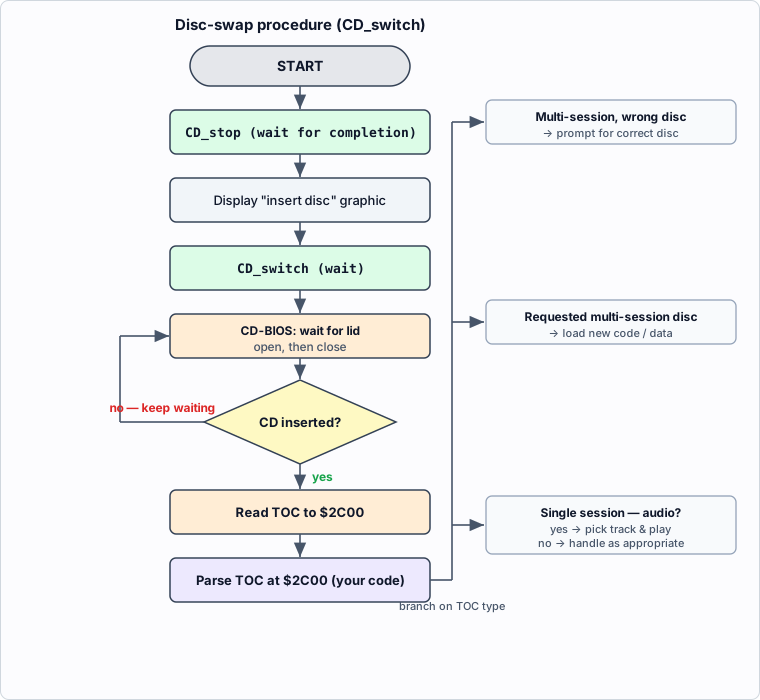
Accessing additional discs
For multi-disc titles, or to let the user swap in a Red Book audio disc,
CD_switch (BIOS rev 4.0+) accepts a new disc and
re-reads the TOC without a reset.
Procedure:
CD_stopwith “wait for completion” set.- Display a graphic asking the user to insert the disc.
- Call
CD_switch(stay in “wait for completion”). - The BIOS waits for the lid to open then close; if a disc was inserted it reads
the new TOC to
$2C00and returns. (If no disc was inserted, it keeps waiting.) - Assume nothing about CD state afterward — reissue
CD_modeetc. - Parse the new TOC at
$2C00and branch on what it is.
Disc-switch decision flow (from the manual’s flowchart):
Do’s and don’ts (summary)
Do
- Route all CD access through the CD BIOS.
- Call
CD_setupfirst. - Work from the TOC at
$2C00; use offsets, not absolute track numbers. - Pre-seek 6 frames early and search 31 frames (or use
CD_initm). - Check
err_flag; implement timeouts; checksum DSP-path data. - Keep 68k interrupt handlers tiny; update object lists on the GPU.
- Add the required Session #0 dummy audio track and the last-session dummy end track (156,192 bytes).
Don’t
- Touch the CD hardware directly.
- Call
CD_getocin shipping code. - Use
ATRI,0x00000000, or0xFFFFFFFFas a partition marker. - Enable extra
JINTCTRLinterrupts while aCD_inithandler runs. - Build object lists in the 68000 vertical-blank handler.
- Put non–Red-Book data in Session #0 (it blocks compatibility encoding).
See also
- CD-ROM BIOS API — full call reference
- Disc & Data Format — headers, partition markers, boot track
- CD-ROM Subsystem Overview
◀ Prev: Disc & Data Format · 🏠 Home · Next: CD-ROM Hardware ▶
Jump to: Architecture · Memory Map · Registers · Instructions · Glossary · CD-ROM